Visual Examples
These examples make the counterfactual search concrete on small two-dimensional problems. They are not meant to be realistic benchmarks; they are meant to show what OCEAN is optimizing and how feature typing affects the move.
The plotting script intentionally avoids queries sitting right on the decision boundary, so the before/after move is visually meaningful.
The figures below are generated by:
python examples/plot_2d_examples.py
Continuous 2D Counterfactual
In this first example, both features are continuous. The background colors show random-forest decision regions, the dark star is the query, and the gold marker is the counterfactual returned by OCEAN.
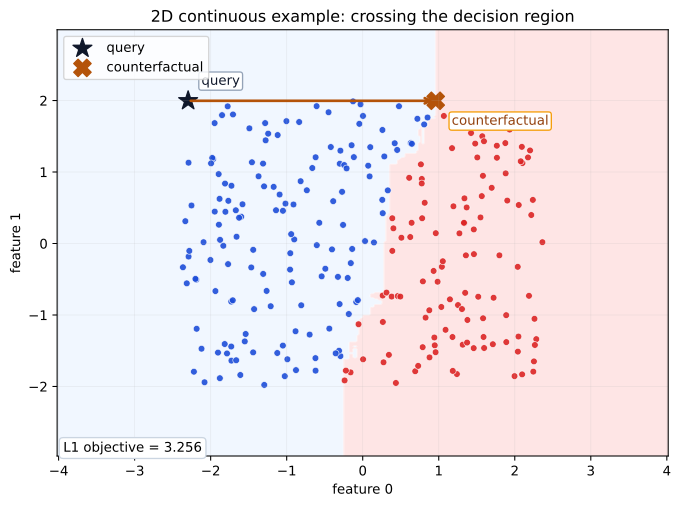
What to notice:
OCEAN does not search for an arbitrary point in the target region; it searches for a nearby point that also respects the model structure.
The arrow is short because the optimization objective is minimizing the counterfactual distance.
The output is still attached to the tree ensemble, not to a smooth surrogate boundary.
Ordinal Discrete 2D Counterfactual
The second example uses one ordered discrete feature on the x-axis and one continuous feature on the y-axis. The dashed vertical lines mark the valid ordinal levels.
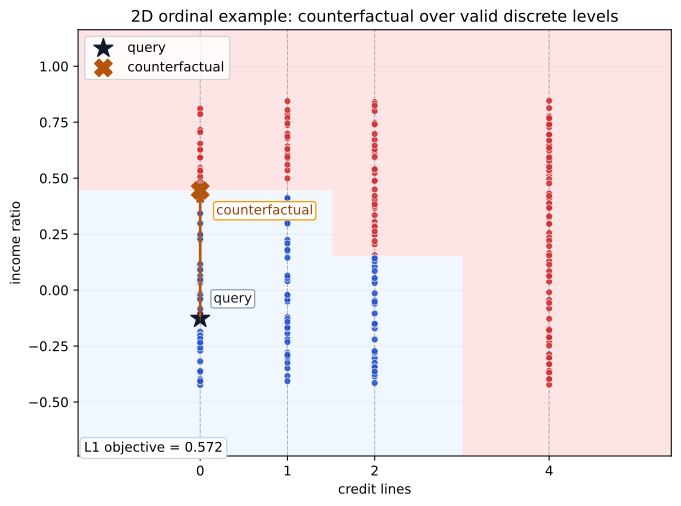
What to notice:
The x-axis feature is ordinal: its valid values are ordered and discrete.
The counterfactual respects those valid levels instead of drifting to an arbitrary x-position.
This is different from an unordered nominal feature, which OCEAN would encode as one-hot columns rather than place on a numeric axis.
How this connects to preprocessing
These figures line up with the feature semantics described in Data Preparation.
Continuous features can move along a numeric axis.
Ordered discrete features move between valid levels.
Unordered nominal categories are one-hot encoded and should not be interpreted as having a left-to-right order.
If you want more visual material later, the next useful additions would be a
backend comparison figure or a side-by-side L1 versus L2 illustration.